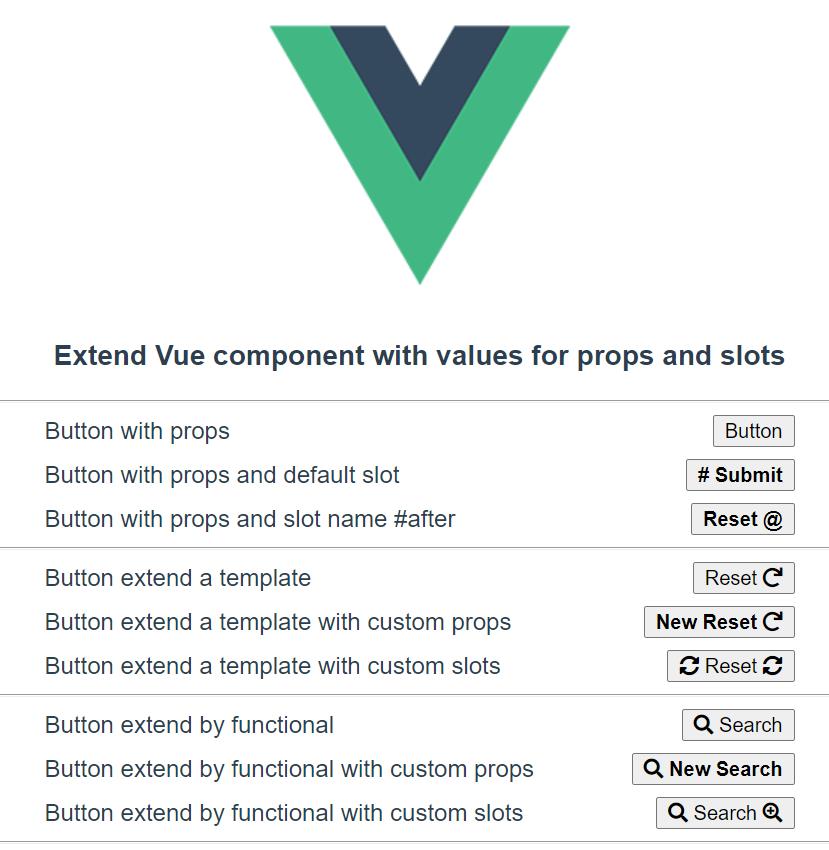
# Vue - Extend Vue component with values for props and slots
談討關於繼承組件以及覆寫 props 與 slots!
關於重新包裝組件的方式,本篇圍繞著 Render Functions 與 Template。
[](https://webdevchallenges.com/persist-access-token-with-vue-js/)
* banner: [Persist Access Token with Vue.js](http://webdevchallenges.com/persist-access-token-with-vue-js/)
前言
--
在工作誤打誤撞下,開始接觸 [Vue](https://vuejs.org/) 一陣子,
在環境中使用了 [Quasar framework](https://quasar.dev/)。
在組件高複用下,經常為了統一樣式,增加不少行數,
因此筆者把常用的組件設定樣式後再封裝一次。
為了讓組件能夠持續使用原有的 [props](https://vuejs.org/v2/api/#props) 以及 [slot](https://vuejs.org/v2/api/#slot),
設定上遇到了不少困難。
本文從理解簡單的 component 建立,
接著實作 [components](https://vuejs.org/v2/guide/components.html) 與 [extends](https://vuejs.org/v2/api/#extends),
以及 [template](https://vuejs.org/v2/api/#template) 與 [render functoins](https://vuejs.org/v2/guide/render-function.html) 的方式。
由於筆者屬於新手入門,當然本篇也以初學者的角度分享,
環境是使用 [options api](https://v3.vuejs.org/api/options-api.html) 的方式,所以不探討 [composition api](https://composition-api.vuejs.org/)。
專案範例放置於:
[https://github.com/explooosion/vue-extend-slot-example](https://github.com/explooosion/vue-extend-slot-example)
* * *
目錄
--
* [前置作業](#0)
* [ㄧ、簡單的組件建立](#1)
* [二、使用 components 包裝 Button](#2)
* [三、使用 extends 繼承 Button](#3)
* * *
前置作業
----
本專案使用 [@vue/cli](https://cli.vuejs.org/guide/prototyping.html) 建立
```bash
npm install -g @vue/cli @vue/cli-service-global
# or
yarn global add @vue/cli @vue/cli-service-global
```
```bash
vue create hello-world
```
為了簡單使用 [fontawesome](https://fontawesome.com/),在 index.html 新增 CDN
\[ public / index.html \]
```html
```
* * *
ㄧ、簡單的組件建立
---------
簡單建立一個 Button 的 component。
利用 v-on, v-bind 方式將 listeners 與 attrs 綁給 button 。
在範例組件中,筆者提供了:
* 3 個 props ( type, label, bold )
* 2 種 slots ( default, #after )
* 1 個 event ( greet )
\[ Button.vue \]
```html
```
```javascript
export default {
name: "Button",
props: {
type: {
type: String,
default: "button",
},
label: {
type: String,
default: "",
},
bold: {
type: Boolean,
default: false,
},
},
};
```
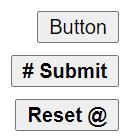
* type: buttoon type \[ button, submit, reset \]
* label: button 的文字
* bold: 如果 true 則為粗體字
使用範例:
\[ App.vue \]
```html
```
畫面預覽:
* * *
二、使用 components 包裝 Button
-------------------------
使用 components 的方式可以想成你又把 Button 組件再包一層起來。
一個 wrapper 的概念,而 DOM 實際上只會有一層 element render 出來
假如想重新封裝一次 Button,並且預先指定好 props 與 slots,
以下範例筆者讓 label 為 Reset,type 為 reset,
並且 slot #after 塞入了一個 redo icon。
\[ ButtonTemplate.vue \]
```html
```
```javascript
import Button from "./Button";
export default {
name: "ButtonTemplate",
components: {
Button,
},
props: {
type: {
type: String,
default: "reset",
},
label: {
type: String,
default: "Reset",
},
},
};
```
三種使用範例:
\[ App.vue \]
```html
```
畫面預覽:
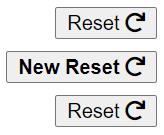
關於上述 3 種使用情境:
#### 1. basic
直接使用我們重新封裝過的,沒甚麼問題。
#### 2\. with props
再次傳遞 Button 組件提供的 props,在外觀上似乎沒問題,
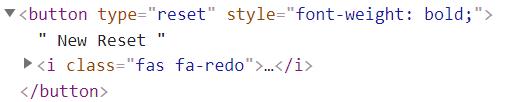
但是查看 DOM tree,bold 被誤當 attrs 加上去了。
[](https://dotblogsfile.blob.core.windows.net/user/robby/07b62e54-0c5b-42da-8a53-9a6a5fc56585/1607760109.png)
因為我們沒有在 ButtonTemplate.vue 告知他是 props
這時你可以把 Button 的 props 透過 spread 方式: ...Button.props 補進來:
\[ ButtonTemplate.vue \]
```javascript
import Button from "./Button";
export default {
name: "ButtonTemplate",
components: {
Button,
},
props: {
...Button.props, // add here
type: {
type: String,
default: "reset",
},
label: {
type: String,
default: "Reset",
},
},
};
```
重新檢視原始碼,就不會被當屬性顯示!
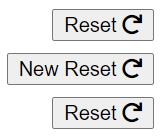
雖然沒被當屬性顯示,但我們傳遞的 bold 也失效了,
因為你接收了 props: bold 但沒做任何處理。
沒有成功接收到 props: bold 的畫面:
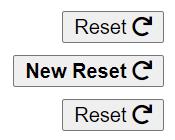
這時你可以在 v-bind 補上 $options.propsData 就沒問題囉!
\[ ButtonTemplate.vue \]
```html
```
成功後的畫面:
#### 3\. with slots
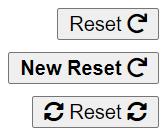
這段我們將 default, 與 name 為 #after 的 slots 傳遞進去,但很明顯地,並沒有成功傳入。
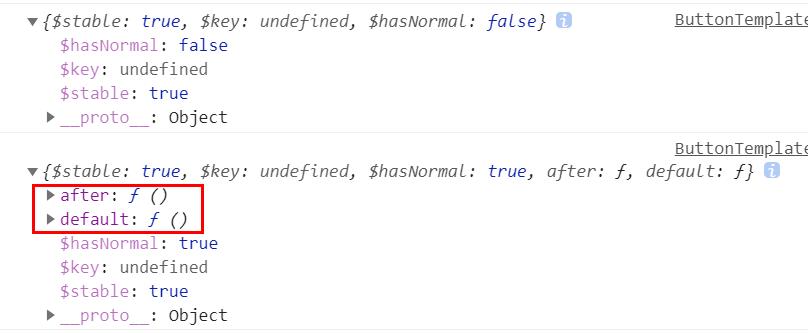
可以嘗試在 mounted 印出 [this.$scopedSlots](https://vuejs.org/v2/guide/components-slots.html#Scoped-Slots-with-the-slot-scope-Attribute),可以發現多了 after 與 default
[](https://dotblogsfile.blob.core.windows.net/user/robby/07b62e54-0c5b-42da-8a53-9a6a5fc56585/1607761811.png)
我們可以利用 v-for 將這段 slots 補進來:
\[ ButtonTemplate.vue \]
```html
```
畫面預覽:
#### 完整的 components 方式:
\[ ButtonTemplate.vue \]
```html
```
```javascript
import Button from "./Button";
export default {
name: "ButtonTemplate",
components: {
Button,
},
props: {
...Button.props,
type: {
type: String,
default: "reset",
},
label: {
type: String,
default: "Reset",
},
},
};
```
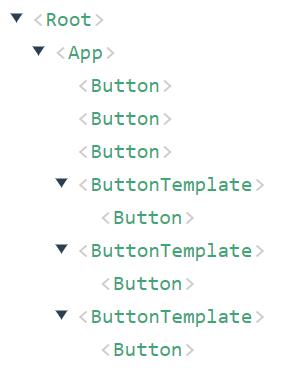
好處是你可以設定 [name](https://vuejs.org/v2/guide/components-registration.html),透過 [Vue.js devtools](https://chrome.google.com/webstore/detail/vuejs-devtools/nhdogjmejiglipccpnnnanhbledajbpd) 找到你的組件。
同時你也可以發現,ButtonTemplate 其實是個 wrapper 概念。
* * *
三、使用 extends 繼承 Button
----------------------
使用 extends 的方式,有別於 component,並不是又包了一層,
而是繼承原有的組件,並且再覆寫原本的 render 內容。
本篇暫不討論 [mixins](https://vuejs.org/v2/guide/mixins.html)。
使用 extends 的方式,以下範例筆者讓 label 為 Search,
後續範例則在 slot 塞入了一個 search icon。
\[ ButtonFunctional.vue \]
```javascript
import Button from "./Button";
export default {
extends: Button,
props: {
label: {
type: String,
default: "Search",
},
},
};
```
* label: 在順序上,如果沒有傳遞 props,就會使用 default value
三種使用範例:
\[ App.vue \]
```html
```
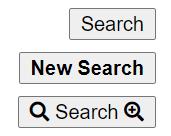
畫面預覽:
關於上述 3 種使用情境:
似乎都是沒甚麼問題。
如果想讓特定 slot 為 search icon,該怎麼做?
由於我們使用 extends,因此改使用 [render functions](https://vuejs.org/v2/guide/render-function.html) 方式。
相關 render functions 也可參考:[簡單的 Vue Render Functions 與動態組件的綜合應用](https://mini-ghost.dev/blog/vue-render-function-dynamic-component/)
在 render functions 中,筆者參考官方的文件 [Slots](https://vuejs.org/v2/guide/render-function.html#Slots),
使用 scopedSlots 方式去設定,其中:
* h: `CreateElement`
* ctx: `RenderContext`
\[ ButtonFunctional.vue \]
```javascript
import Button from "./Button";
export default {
extends: Button,
functional: true,
props: {
label: {
type: String,
default: "Search",
},
},
render(h, ctx) {
return h(
"Button",
{
...ctx.data,
props: {
...ctx.props,
/** use props or extend here */
},
scopedSlots: {
...ctx.scopedSlots,
default: () => h("i", { class: ["fas", "fa-search"] }),
/** use slots or extend here */
},
},
...(ctx.children || [])
);
},
};
```
* functional: true。由於我們組件屬於無狀態,又需要接收 props,因此設置為 true,把組件寫成 functinal component。
* props: 預設值可寫在最外層的 props,如果寫在 render functions 的 props,則代表強制蓋掉指定的 props
* scopedSlots: 將原本的 scopedSlots 展開,並於 default 處設定我們的 search icon,你也可以把 default: 根據 slot name 改成 after:
* ctx.children: 如果我們有在 ButtonFunctional 標籤內新增內容,那就是 child 囉!
關於 functional:
由於該組件不處理 data,我們可以轉換成無狀態的寫法,
筆者使用 Functional Component \+ render function 方式,因此把 functional 設置為 true。
* [https://vuejs.org/v2/api/#functional](https://medium.com/js-dojo/vue-js-functional-components-what-why-and-when-439cfaa08713)
* [Vue.js functional components: what, why, and when?](https://medium.com/js-dojo/vue-js-functional-components-what-why-and-when-439cfaa08713)
當然你也可以改使用 Functional Component + Vue Template,改寫後跟前面組件 ButtonTemplate 結構類似,如下:
```html
```
```javascript
import Button from "./Button";
export default {
extends: Button,
props: {
label: {
type: String,
default: "Search",
},
},
};
```
關於 children 範例:
```html
child1
child2
```
畫面預覽:
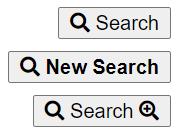
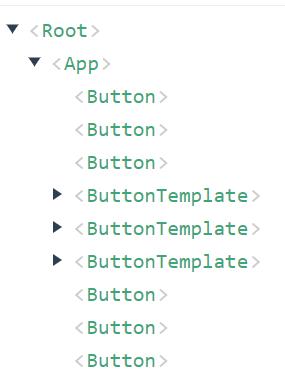
有個小缺點是你無法透過 [Vue.js devtools](https://chrome.google.com/webstore/detail/vuejs-devtools/nhdogjmejiglipccpnnnanhbledajbpd) 找到你的組件。
* * *
專案範例放置於:
[https://github.com/explooosion/vue-extend-slot-example](https://github.com/explooosion/vue-extend-slot-example)
[](https://dotblogsfile.blob.core.windows.net/user/robby/07b62e54-0c5b-42da-8a53-9a6a5fc56585/1607769127.png)
Reference
---------
* [https://vuejs.org/v2/guide/](https://vuejs.org/v2/guide/)
* [https://v3.vuejs.org/api/options-api.html](https://v3.vuejs.org/api/options-api.html)
* [https://vuejs.org/v2/guide/render-function.html#Slots](https://vuejs.org/v2/guide/render-function.html#Slots)
* [https://composition-api.vuejs.org/](https://vuejs.org/v2/guide/render-function.html#Slots)
* [https://mini-ghost.dev/blog/vue-render-function-dynamic-component/](https://mini-ghost.dev/blog/vue-render-function-dynamic-component/)
* [https://stackoverflow.com/questions/57493900/how-to-extend-vue-component-with-default-values-for-props-and-slots](https://stackoverflow.com/questions/57493900/how-to-extend-vue-component-with-default-values-for-props-and-slots)
有勘誤之處,不吝指教。ob'\_'ov